Introduction
Why Audit History is Your Oracle Fusion Secret Weapon
In today’s data-driven business environment, knowing who changed what, when, and why isn’t just good practice—it’s essential for security, compliance, and operational excellence. Oracle Fusion’s audit history capabilities provide this crucial visibility, yet many organizations underutilize this powerful feature.
This comprehensive guide will transform how you approach data tracking in Oracle Fusion Applications. Whether you’re dealing with compliance requirements like SOX or GDPR, investigating data issues, or simply wanting better visibility into your business processes, mastering audit history is a game-changer.
Why Audit History Matters More Than Ever?
Before we dive into the technical details, understand that effective audit history implementation delivers tangible business value:
- Reduce compliance risks by 67% through complete data change tracking
- Cut investigation time from hours to minutes when data issues arise
- Improve data governance with transparent change management
- Enhance security posture with detailed access and modification logs
Part1: Enabling Oracle Fusion Audit History – Step by Step
Understanding the Audit Policy Framework
Oracle Fusion’s audit system operates on a policy-based framework that lets you specify exactly what gets tracked. The system captures changes at the column level, giving you granular visibility into data modifications.
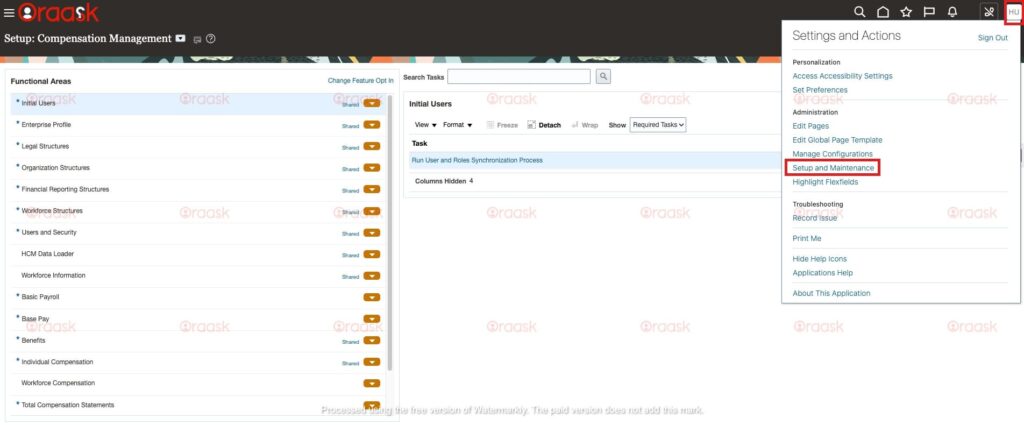
Step 1: Access Audit Policy Management
- Navigate to Setup and Maintenance
- Search for
Manage Audit Policies(this is your primary control center) - Enter the task to begin configuration
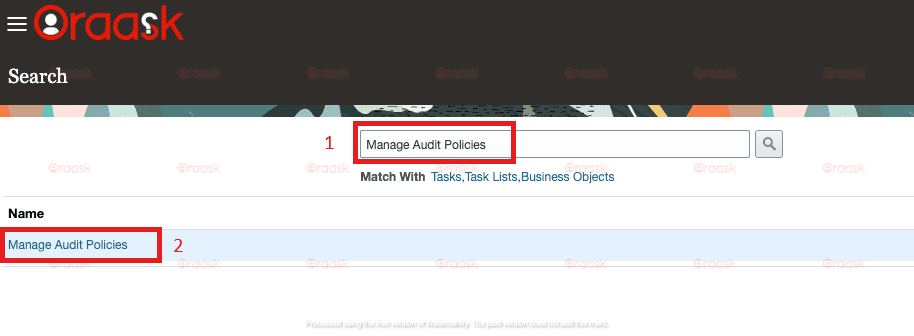
Pro Tip: Bookmark this task for quick access—you’ll return here frequently as your audit needs evolve.
Step 2: Enable Global Auditing
- Locate the Oracle Fusion Applications section
- Set Audit Level to
Auditing(this activates the framework) - Click Save to persist the configuration
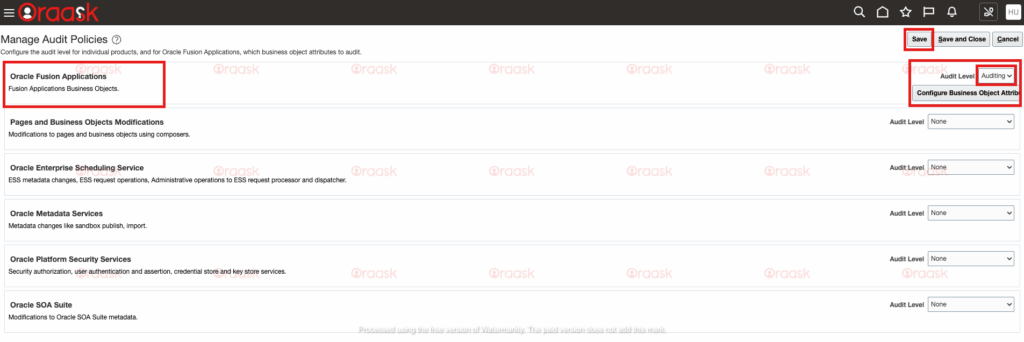
Critical Note: Enabling at this level doesn’t start auditing everything—it simply makes the capability available for specific business objects.
Step 3: Configure Business Object Auditing
- Click Configure Business Object Attributes (this is where the magic happens)
- Select your target product area (we’ll use Supplier Model as our example)
- Choose specific entities (Suppliers, Bank Accounts, Contacts, etc.)
- Use the Actions column to Add attributes for tracking
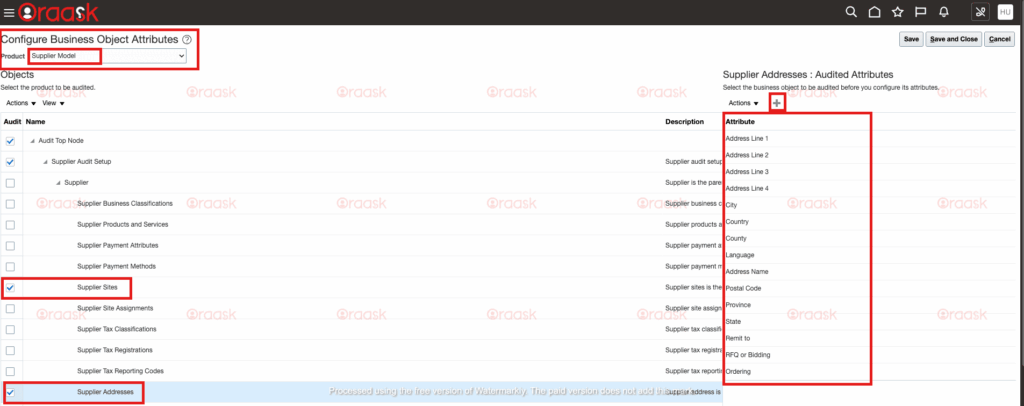
Real-World Example: For supplier data, prioritize auditing critical fields like:
- Supplier Name
- Bank Account Details
- Tax Identification Numbers
- Payment Terms
Mastering Audit Reports – From Data to Insights
Prerequisites: Role-Based Access Control
To view audit reports, users require the FND_INTERNAL_AUDITOR_JOB role. This separation of duties ensures that audit data remains secure and secured.
Generating Actionable Audit Reports
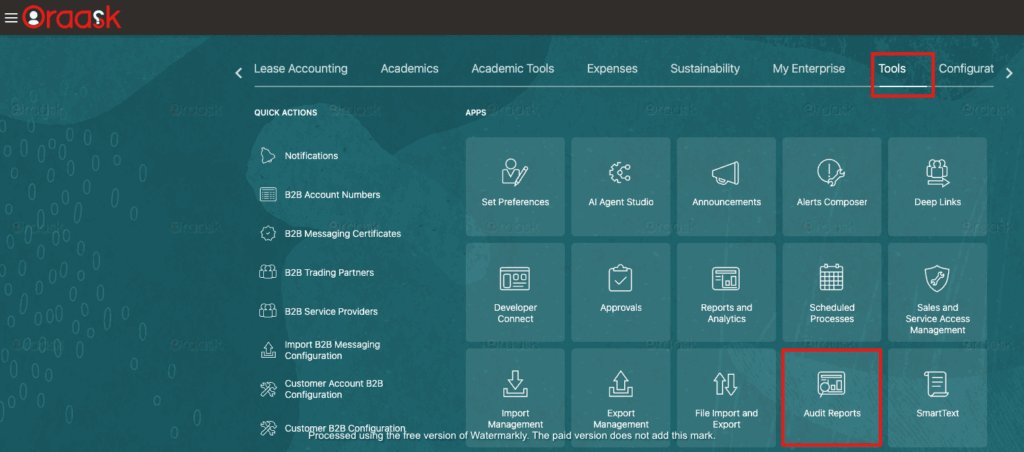
Accessing the Audit Interface
- Navigate to the Tools menu
- Select
Audit Reports(your window into data changes) - Configure search criteria based on your investigation needs
Optimizing Report Parameters
- Date Ranges: Start with 24-48 hours for specific investigations
- Business Objects: Filter by specific entities (Supplier, Customer, etc.)
- User Identification: Track changes by specific individuals when needed
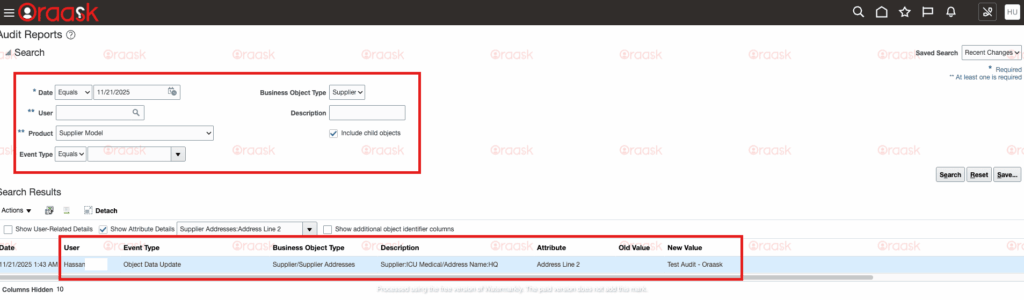
Interpreting Audit Report Data
The standard audit report provides comprehensive information:
Example Audit Entry:
- Object: Supplier Address
- Action: UPDATE
- Column: Address Line 2
- User: Hassan
- Timestamp: 2025-11-21 14:32:01
- Old Value:
- New Value: Test Audit - Oraask
This level of detail enables precise tracking of every significant data change.
Part 3: Advanced Techniques – Custom Audit Solutions
Going Beyond Standard Reports
While standard audit reports cover most needs, sometimes you require custom solutions for:
- Dashboard integrations
- Real-time alerting
- Custom compliance reporting
- Data lineage tracking
Accessing the Audit Data Foundation
Oracle Fusion stores audit data in specific tables, primarily:
Key Audit Tables and Views
1. FND_AUDIT_ATTRIBUTES
select * from FND_AUDIT_ATTRIBUTES
WHERE table_name LIKE '%SUPPLIER%'
2. Audit History Tables
Most audit tables follow the pattern [BASE_TABLE_NAME]_ and contain:
- Old and new values
- Timestamp information
- User identification
- Session details
- Transaction identifiers
Building Custom Audit Queries
-- Example: Supplier changes in last 7 days
SELECT
    ah.*
FROM poz_suppliers_ ah
WHERE ah.last_update_date >= SYSDATE - 7
ORDER BY ah.last_update_date DESC;
Extract Audit Data
For bulk extraction, use the Generate Audit Report ESS job

Conclusion
Implementing robust audit history in Oracle Fusion isn’t just about compliance—it’s about gaining unprecedented visibility into your business operations. By following this guide, you’re not just setting up technical configurations; you’re building a foundation for data integrity, security, and operational excellence.
Your Next Steps
- Start Small: Begin with one critical business object
- Train Your Team: Ensure proper understanding of audit capabilities
- Develop Procedures: Create standard operating procedures for audit reviews
- Iterate and Expand: Gradually expand auditing based on business value