
Controlling user authentication is one of the most critical responsibilities for any Oracle administrator. In this guide, you’ll learn exactly how to Control Password Policy in Oracle Fusion, enforce stronger security standards, and reduce common risks like account lockouts, weak passwords, and compliance failures. Whether you’re an ERP consultant, security admin, or cloud architect, this breakdown will help you configure a safe, audit-ready password strategy for your Fusion environment.
- What Is the User Password Policy in Oracle Fusion?
- How to Configure Password Policy in Oracle Fusion (Step-by-Step)
- Recommended Best Practices for Password Policy
- Common Mistakes When Managing Password Policy (and How to Avoid Them)
- Example of a Strong Password Policy in Oracle Fusion (2025)
- FAQs About Password Policy in Oracle Fusion
- Conclusion: Building a Secure, Audit-Ready Password Policy
Surprisingly, password policy misconfiguration is one of the most common weaknesses found during internal audits, SOX reviews, and external security assessments.
A poorly configured password policy leads to:
- Frequent account lockouts
- Excessive service desk tickets
- Increased risk of brute-force attacks
- Compliance failures
- Weak user authentication practices
The good news?
Oracle Fusion provides a fully configurable User Password Policy inside the Security Console that allows administrators to control complexity, expiration, history, retries, lockout behavior, and more.
In this guide, you’ll learn how to control Password Policy in Oracle Fusion, recommended best practices, and how to avoid the common mistakes that many organizations still make in 2025.
What Is the User Password Policy in Oracle Fusion?
The User Password Policy is a configurable set of rules that determines how passwords are created, managed, and validated inside Oracle Fusion Cloud Applications.
This policy acts as the first layer of defense and controls:
🔸 Minimum password length
Prevents short, easy-to-guess passwords.
🔸 Password complexity requirements
(Uppercase, lowercase, numbers, special characters)
🔸 Password expiration rules
Determines how long a password remains valid.
🔸 Password reuse limitations (history)
Blocks users from recycling old passwords.
🔸 Self-service reset behavior
How users reset their passwords when forgotten or expired.
Together, these settings determine how secure the sign-in process is across all Fusion modules (HCM, Financials, SCM, Projects, Procurement, etc.).
How to Configure Password Policy in Oracle Fusion (Step-by-Step)
Below is a simplified configuration walkthrough to help administrators set up or update the policy.
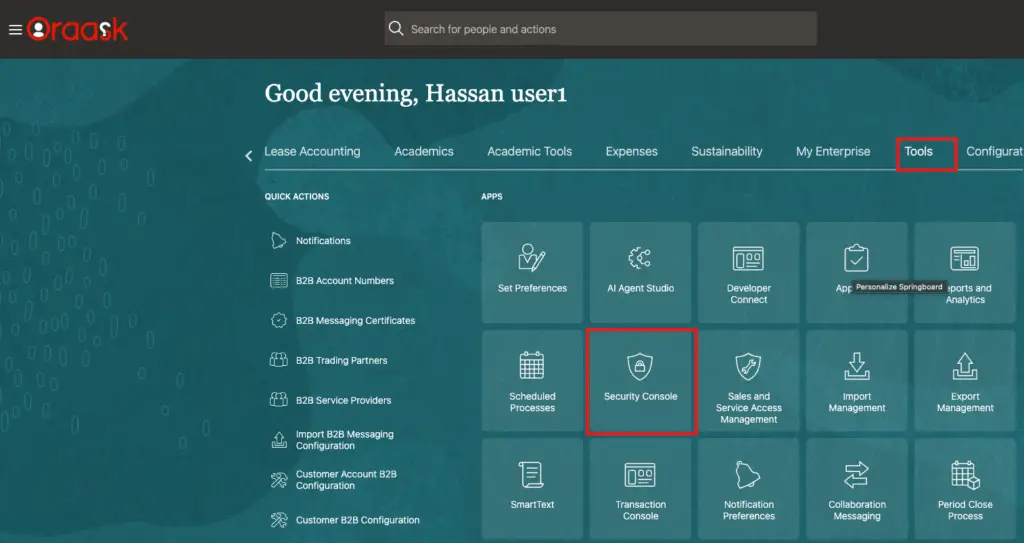
Step 1: Go to Security Console
Navigate to: Tools → Security Console
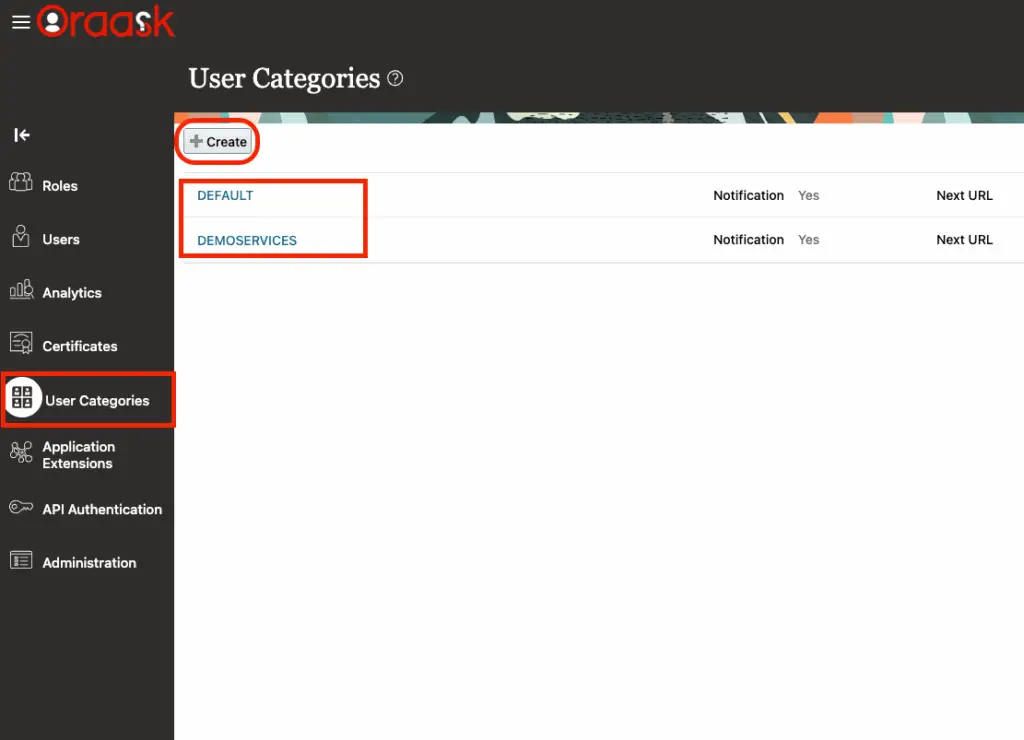
Step 2: Go to User Categories
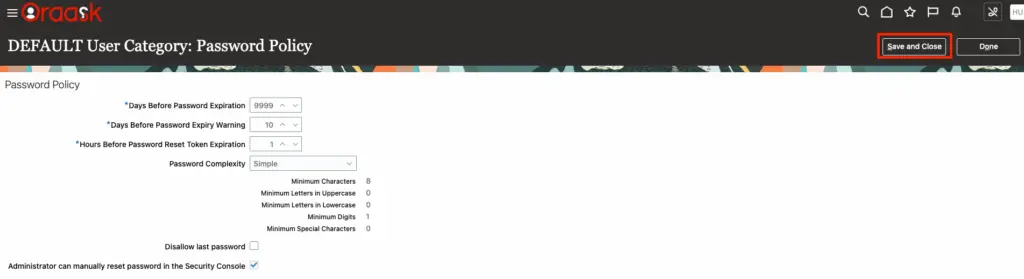
Navigate to: Tools → Security Console → User Categories → Password Policy
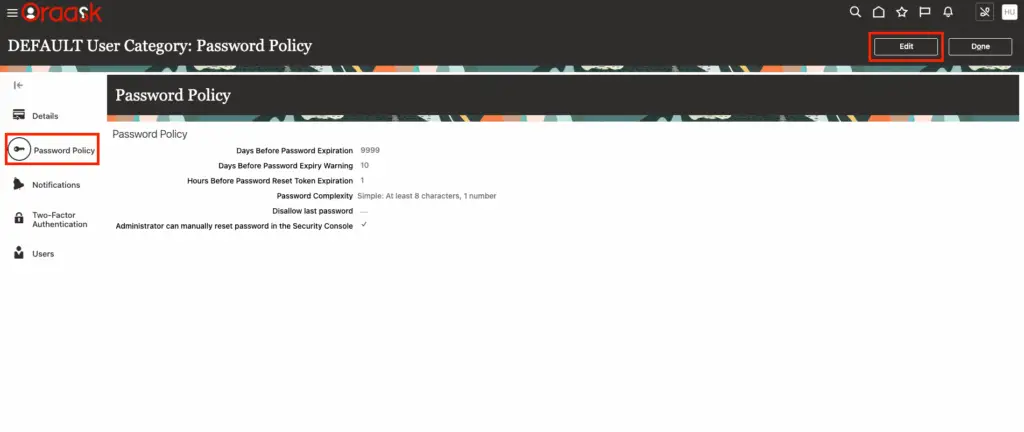
Step 3: Review Existing Configuration
Before changing anything, assess:
- Current complexity rules
- Expiration cycles
- Password history usage
This helps you understand whether your existing setup meets today’s security standards.
Step 4: Modify Each Setting
Based on your internal security governance, update settings such as:
- Minimum length
- Complexity (uppercase, numbers, symbols)
- Expiration period
- Lockout attempts
- Password reuse count
Each field can be changed instantly and applied systemwide.
Step 5: Test the New Policy
Ask a test user or admin account to:
- Create a new password
- Reset their password
- Trigger a failed login
- Attempt a lockout scenario
This confirms the policy behaves as expected.
Recommended Best Practices for Password Policy
To balance security and usability, consider adopting the following best practices.
✔ Use MFA (Multi-Factor Authentication)
If MFA is enabled, password restrictions can be slightly relaxed without reducing security.
✔ Avoid Extremely Short Expiration Cycles
Changing passwords too frequently frustrates users and increases support tickets.
Avoid: 30-day expirations
Better: 60–90 days
✔ Avoid Allowing Simple Default Passwords
Disable common risky patterns:
- Welcome1
- Password123
- Firstname123
- Company2025
✔ Enforce Strong Complexity Rules
At minimum:
- 1 uppercase
- 1 lowercase
- 1 number
- 1 special character
✔ Educate Users on Risks
Share internal guidelines on:
- Avoiding predictable patterns
- Not reusing passwords across systems
- Using password managers
✔ Keep Lockout Rules Balanced
Too strict = frustrated users
Too relaxed = higher risk
Recommended:
5 failed attempts → 15–30 min lockout
Common Mistakes When Managing Password Policy (and How to Avoid Them)
Even skilled administrators often make the following errors:
❌ Setting the minimum length too short
6–8 characters is no longer secure.
Use 12+ minimum.
❌ Requiring too frequent password changes
Overly aggressive expiration leads to predictable patterns like:
- PasswordJan2025
- Oracle1234!
- Qwerty2025
❌ Setting the lockout threshold too low
3 failed attempts = high risk of accidental user lockouts.
❌ Not communicating policy changes in advance
Leads to chaos and unnecessary help desk tickets.
❌ Allowing password reuse
If users can reuse old passwords, your policy loses its purpose.
❌ Ignoring self-service password reset settings
If users can’t reset passwords easily, IT will drown in support tickets.
Example of a Strong Password Policy in Oracle Fusion (2025)
Below is a recommended “baseline” configuration suitable for most enterprises:
🔐 Minimum length: 12
🔐 Complexity: Uppercase + lowercase + number + symbol
🔐 Expiration: 90 days
🔐 Password history: 10
🔐 Failed attempts: 5
🔐 Lockout duration: 15 minutes
🔐 Self-service reset: Enabled with email verification
This policy meets enterprise, audit, and security requirements while keeping usability reasonable.
FAQs About Password Policy in Oracle Fusion
Q1: Does changing password policy impact all modules?
Yes. Password rules apply to all Oracle Fusion Cloud modules.
Q2: Can I set different password policies for different user types?
No. The password policy is global across the environment.
Q3: Does enabling MFA reduce password requirements?
It can, but depends on your internal security standards.
Conclusion: Building a Secure, Audit-Ready Password Policy
Managing password policy in Oracle Fusion is a critical part of your overall cloud security strategy.
By configuring complexity rules, setting proper expiration cycles, enforcing lockout behavior, and enabling self-service resets, you strengthen your system against both internal and external threats.
A well-tuned password policy leads to:
✔ Higher security
✔ Fewer lockouts
✔ Better compliance
✔ Smoother user experience
If you’re responsible for Oracle Fusion security, review your password policy regularly—and align it with evolving cybersecurity expectations.


Assalamu Alaikum Hassan,
I did not found any option in Oracle Fusion application for:
Since you have mentioned in this blog, can you let me know where can i find these features in Fusion application for above mentioned 3 features.
Looking forward for your response and ideas.
Regards,
Mohammed Rehaan
WeAlikum Alsalam Mohammed,
Those 3 options you can control them right from OCI not from fusion unfortunately.
Regards,
Hassan